Android Parental Controls:
The Unbypassable Set Up
Kids easily learn to bypass parental control apps. To protect them, you need an unbypassable set up. Learn more below:
I'm Vic, a geek who went down into the parental controls' rabbit hole. If you want your kids to be safe online, read this page carefully.


I'm Vic, a geek who spent months looking for an Android parental controls app that kids can't bypass. If you want your kids to be safe online, avoid the "10 best parental controls" articles, and read this page carefully.
Are your kids dumb?
Parental control companies seem to think they are.
Because all it takes to bypass their Android parental controls is a YouTube tutorial!
Listen:
If your kids would search on Google "how to bypass Bark / Qustodio / Famisafe / Net Nanny / Norton / etc."
They'd find dozens of tutorials teaching them how to bypass each of these paid parental control apps

And even if your kids don't find these tutorials by themselves, their friends will show them sooner or later.
And just like that, your kids will be able to scroll on TikTok all day... stumble upon porn... chat with seemingly nice strangers... post embarrassing comments or pictures on social media that could get them bullied until the end of high school... wander in every corner of the internet...
All of that behind your back - even though you're PAYING for so-called parental "controls."
Did you know that 6 kids of 10 bypass parental controls?
If you've never heard of it before, it's normal:
Parental control companies obviously won't advertise that their apps are bypassable.
Because they want your money in their pockets.
Same thing for the influencers and review websites who are raving about the "10 best parental controls." They earn a commission on each sale, so they keep the secret.
But when you dig deeper, you find these kinds of reviews for every paid parental control app you can think of:
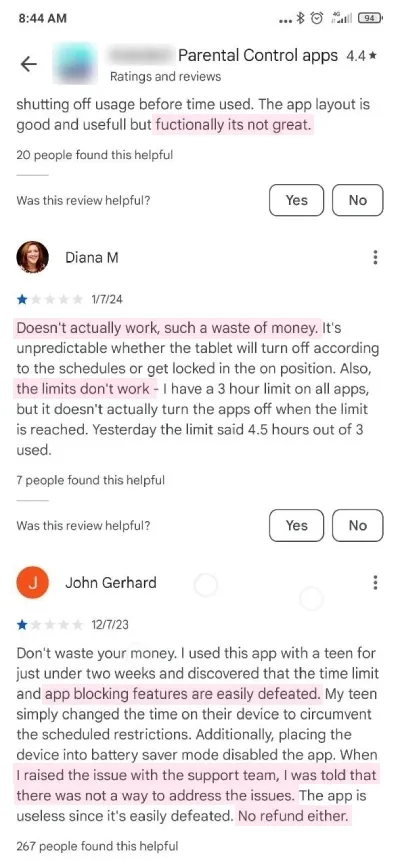
It's time to end this nonsense.
If you want foolproof online protection and limits for your kids, read the rest of this page carefully:
I'm Vic, a techie who scoured the net for months in search of a foolproof Android parental control. I've tried every app, every tutorial, every "hack."
Hundreds of hours of research and trials and errors.
And I've finally found a way to set up parental controls that kids can't bypass.
The solution was partly brought up by Android developers themselves.
They know the Android system better than everyone else. And they don't take kids for dummies - or their parents for cash cows.
In fact, sorting through all the paid parental control apps is now foolish:
Not to mention that your kids can easily bypass these paid apps... (Again, just check some bypassing tutorials on Google or reviews on the Play Store; you'll be stunned.)
...There are way better parental controls already embedded into Android devices.
These controls are perfectly integrated with the Android ecosystem.
This is impossible for other parental controls, no matter how much you pay for them.
But most important:
After some tweaks and following some recommendations, these embedded Android parental controls simply cannot be bypassed!
Factory reset? Nope.
Battery saver mode? Nope.
Time change, in-app browsers, VPN...? Nope, nope, and nope.
Your kids can try every trick they want and every tutorial they find.
Not even a jailbreak will work.
These embedded Android parental controls will keep your kids safe no matter how tech-savvy they are. Unless...
Unless you set them up the wrong way!
Pay attention:
By default, these embedded Android parental controls aren't foolproof.
I had to fiddle around the app to make it unbypassable:
I tested diverse bypassing tricks until I fixed every little flaw. I also added a private DNS to cover in-app browsers, and excluded a list of websites that could be used to bypass the content filters.
It's easy once you know what you're doing, but if you get these settings wrong, your kids will find ways to bypass your limits.
Worse, they will be exposed to all the inappropriate content and people there are online.
That's why I created a guide showing you how to set up the embedded Android parental controls the foolproof way:
The Foolproof Android Guide.
More than a hundred hours of work went into it.
Before I tell you more about this guide, check this out:
This is how much parental controls cost over a 5-year period
Keep in mind that they all offer the same features (except for being unbypassable)
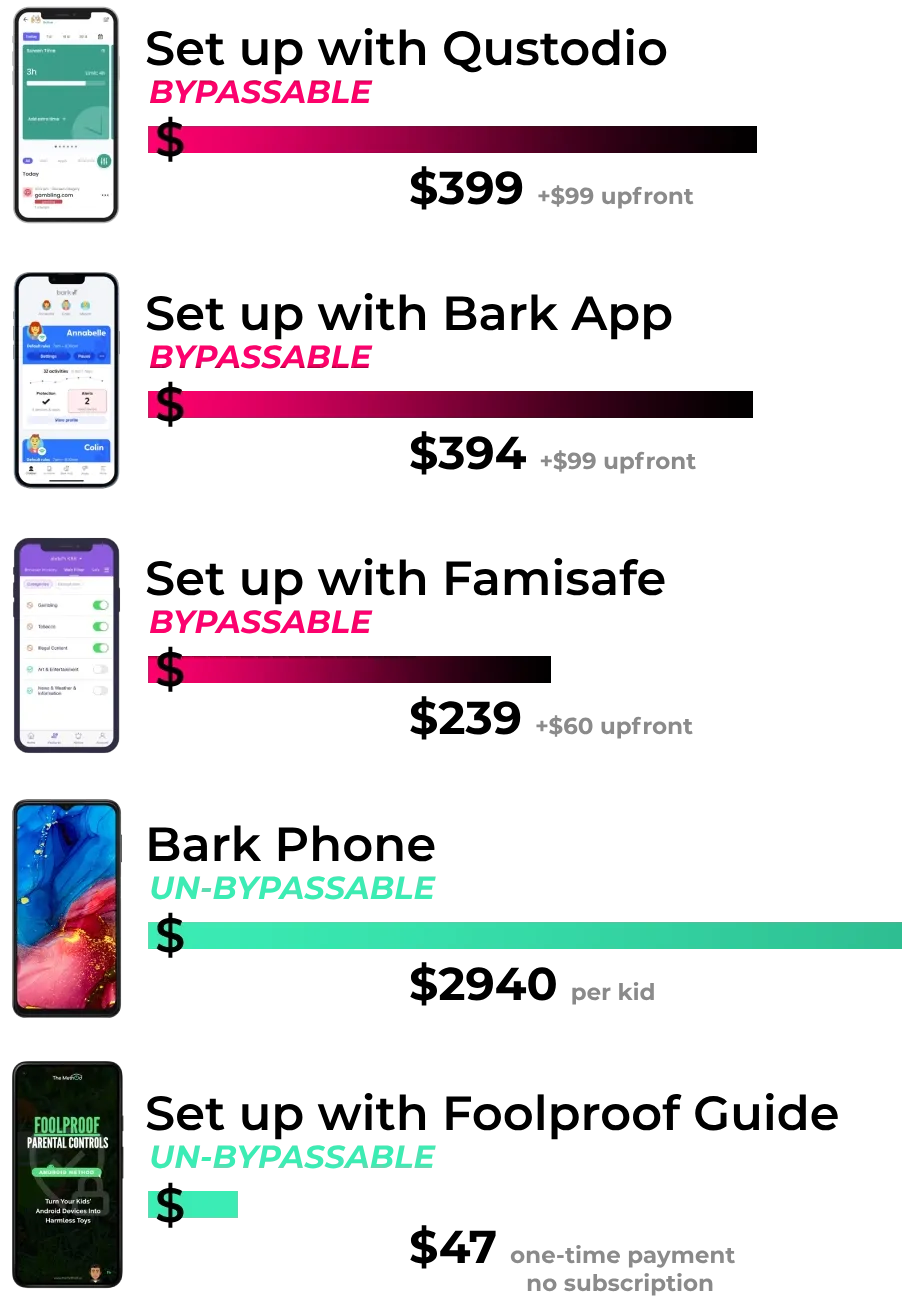
As you can see, "classic," bypassable parental controls all cost hundreds of dollars over a 5-year period.
(I've only shown three paid parental control apps above, but others are all in the same price ranges, and bypassable.
Even the parental controls allegedly "not deletable" or "tamper-proof" can be bypassed.)
And these paid parental controls have another "hidden" cost
Because your kids can bypass their screen time limits, app blocking, and content filters...
These controls may end up costing you a lot more than hundreds of dollars a year.
It could cost your kids good grades; because they would be able to scroll endlessly, preventing them from studying a little more.
It would also cost you the peace of mind that your kids aren't seeing inappropriate things.
(And if they do see traumatizing things, it could cost your kids their innocence and you, a lot of therapy sessions...)
But that's not all.
One of the worst hidden cost of bypassable parental controls is this:
Because your kids could spend all of their free time on their devices instead of using some time to create, learn, and develop skills...
...Bypassable parental controls could prevent them from becoming who they could become.
You can't find your vocation, let alone work on it, if you're scrolling during every second of free time you have...
But enough with the grim stuff.
If you want parental controls that live up to their name?
You could go for the Bark Phone (it's a smartphone with Bark's parental controls pre-installed, allegedly unbypassable).
It will end up costing you thousands of dollars over the years. For a smartphone that is worth $150 retail.
And for which your kids' will whine about the frontcam quality and their games lagging.
Plus, you still have to get foolproof parental controls for their tablets. So here's the second option:
Get The Foolproof Android Guide to turn your kids' devices into unbypassable toys that you have total control over.
There's a 30-day free trial for it, and once it ends, it costs only $47, one-time, for as many tablets and smartphones as you want, and for as long as you want. No subscription required!
(Note that $47 is even less than the upfront payment required for paid parental controls.)
In short, not only are you saving hundreds of dollars by using my guide to set up the embedded Android parental controls, you're also getting parental controls that your kids can't bypass.
This will save you and your kids a lot more than just money.
The Foolproof Android Guide is the best way to achieve foolproof security for your kids...
...and peace of mind for you.
This gives your kids all the chances to grow up into savvy and admired adults you'll rave about.
But maybe you feel like the embedded Android parental controls wouldn't offer as many features as paid parental controls.
Well, it was the case a few years ago.
But, now, as you'll see below, the embedded Android parental controls are as good. Not to mention the fact that they're unbypassable if you set them up with the Foolproof Android Guide.
Here's what you get:
Parental controls' usual features, butFOOLPROOF
No paid parental controls required. All you need is the Foolproof Android Guide
Parental controls' usual features, but
FOOLPROOF
No paid parental controls required. All you need is the Foolproof Android Guide
Sweet Dreams
Foolproof content filters
By following your guide? No porn and whatever inappropriate content can reach your kids' devices. Because I added an improved content filter that resists every trick under the sun, such as using a VPN or in-app browsers. Which is why it's set up on +4.5 million devices.
Your kids will sleep well, and you will too.
No Fights Over The Devices
Foolproof screen time limits
You don't have to fight with your kids to make them hand over their devices when they have to do their homework. Or eat with you. Or when they spent too much time numbing their brains. Because you can just set up screen time limits for the whole day, and on any apps you want.
And, of course, it's unbypassable.
No Missed Memories
Foolproof one-tap lock
If you're sick of seeing your kids seek free Wi-Fi and escape family time wherever you go or whatever you propose to do... this feature is for you. Because you can lock your kids' devices with a click on your app.
You'll create lifelong memories instead of seeing Big Tech steal your kids from you.
Oversee Their Digital World
Foolproof app and screen time monitoring
Watch from your smartphone what apps are installed on your kids' devices. And the time they spend on each one.
On top of that, your kids can't install new apps without your approval. So you don't have to check on their devices to see if they aren't hiding an app you would disapprove of.
Sharp & Smart
Foolproof downtime periods
Keep your kids away from their mesmerizing devices with timers and downtime periods. Un-bypassable ones, of course.
(It's surprisingly easier to get good grades when you're not rushing through your homework to play on the tablet.)
Lawmaker Power
Foolproof app blocking
Ban apps that shatter kids' development and mental health... as well as the ones invaded by drooling predators. On top of that, your kids can't download an app without your approval. Social media, inappropriate games, and dating apps will be kept away from your kids' devices as long as you want them to be.
No Morning Yelling
Foolproof sleep time lock
Thanks to the device's foolproof locking up when it's time to be a cute little asleep angel, your kids aren't zombified until 3 a.m. by dumb videos or games... So they wake up all freshened up.
No more "hurry up, you're gonna be late!!". No more feeling all stressed out every morning.
Peace Of Mind
Website & YouTube Monitoring
From your phone, you can see what websites your kids visit and what videos they watch on YouTube. This way, you can ensure that everything works fine in case you have a doubt about it.
And, because it's the Android controls, you can also restrict the content on YouTube depending on your kids' age.
In short, there's everything you need to be in control of your kids' digital worlds!
You just need to set up the embedded Android parental controls the foolproof way. It's easy with your Foolproof Android Guide. Click on the button below to order it:

+76.2K parents trust the tools I present

Here's why +3 millions of parents love it:
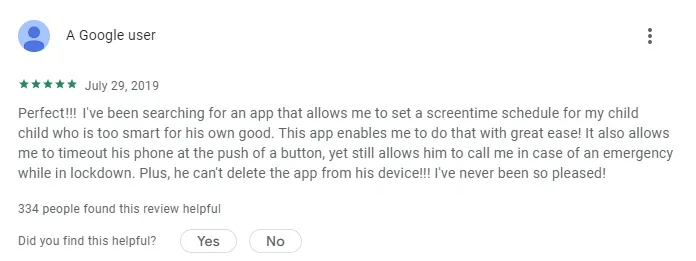
"Perfect for my child who is too smart for his own good"
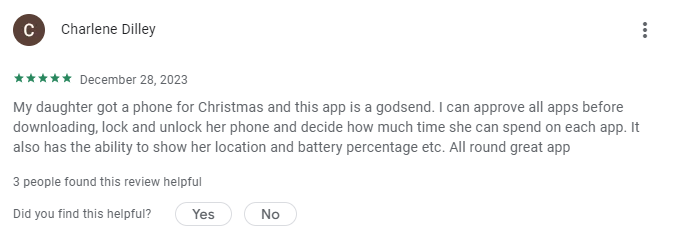
"I can approve all the apps before downloading"
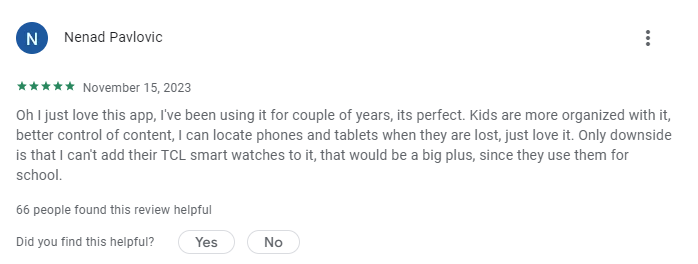
"Kids are more organized with it"
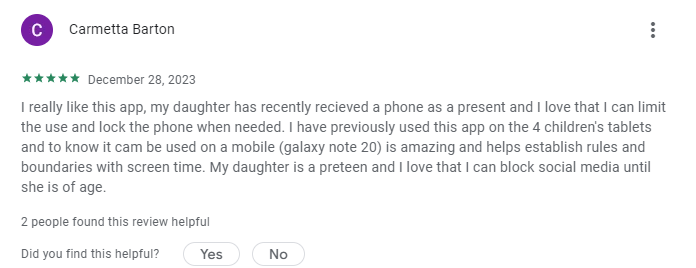
"I love that I can block social media until she is of age"
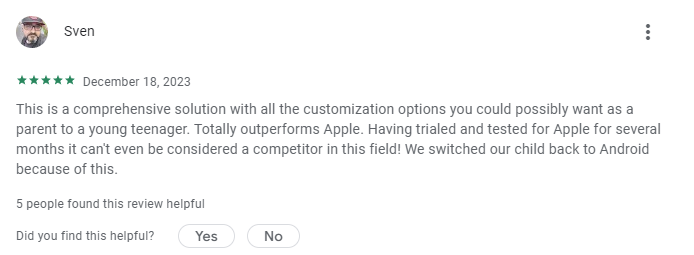
"We switch our child back to Android because of this"
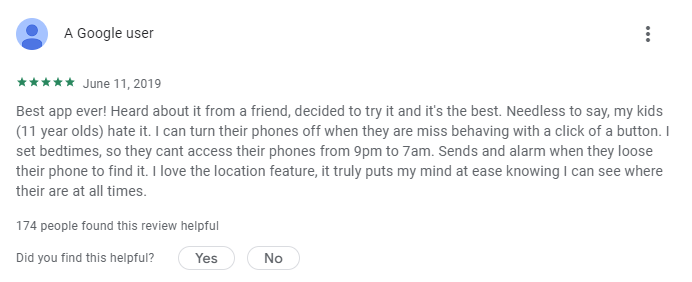
"I can turn their phones off with a click of a button"
Ready to join +3 millions of tech-responsible parents?
Click on the button below to order your Foolproof Android Guide:
This button will bring you to a secure order page
+76.2K parents trust the tools I present
Exciting?
Wait 'till
you hear this:

Exciting?
Wait 'till you hear this:
I think you'd agree that price doesn't matter when it comes to your kids' safety.
Nevertheless, I wanted to make the Foolproof Android Guide affordable for everyone.
You may be aware that parental controls often cost a dozen dollars a month - even more if you want to protect several devices.
Over all of your kids' childhood, you'd have to spend at least hundreds of dollars on parental controls!
(Even thousands if you buy a Bark Phone.)
But you don't have to.
Because your Foolproof Android Guide only costs a one-time payment of $47.
No matter how many devices you want to set up...
No matter for how long...
No subscription needed!
So, instead of having to spend hundreds of dollars on parental controls that aren't even foolproof in the first place?
You're only spending $47 one time on the Foolproof Android Guide.
Not only are you spending a fraction of what paid parental controls cost, but you're also getting something they can't offer:
The peace of mind that your kids will stay safe no matter how many hacking tutorials they'll try.
But you don't have to take my word for it.
Not only there's a 30-day free trial, but that's not all:

It's money-back guaranteed for 3 months
I've tried again and again in every possible way to bypass the safeties and limits set up with my guide.
I still do it frequently to update it and ensure everything works well. No kid was ever able to bypass my setup.
As a result, I know that will be safe. And I know that you'll love it.
That's why I can offer this 3-month money-back guarantee. Here's how it works:
Order your guide, use it to secure your kid's digital world, try to bypass it all you want...
And if at any point your Foolproof Android Guide doesn't meet your expectations... if you don't have the absolute peace of mind that your kids aren't doing unspeakable things on their devices... or if there's anything else that doesn't make you happy about your Foolproof Android Guide...
I insist you ask me for a full refund at contact@themethod.us.
You'll get your money back, no questions asked. No hard feelings.
To get your guide, it's simple:
Click on the pink button below. You'll be taken to this order page:
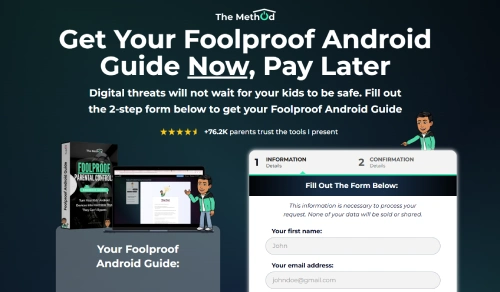
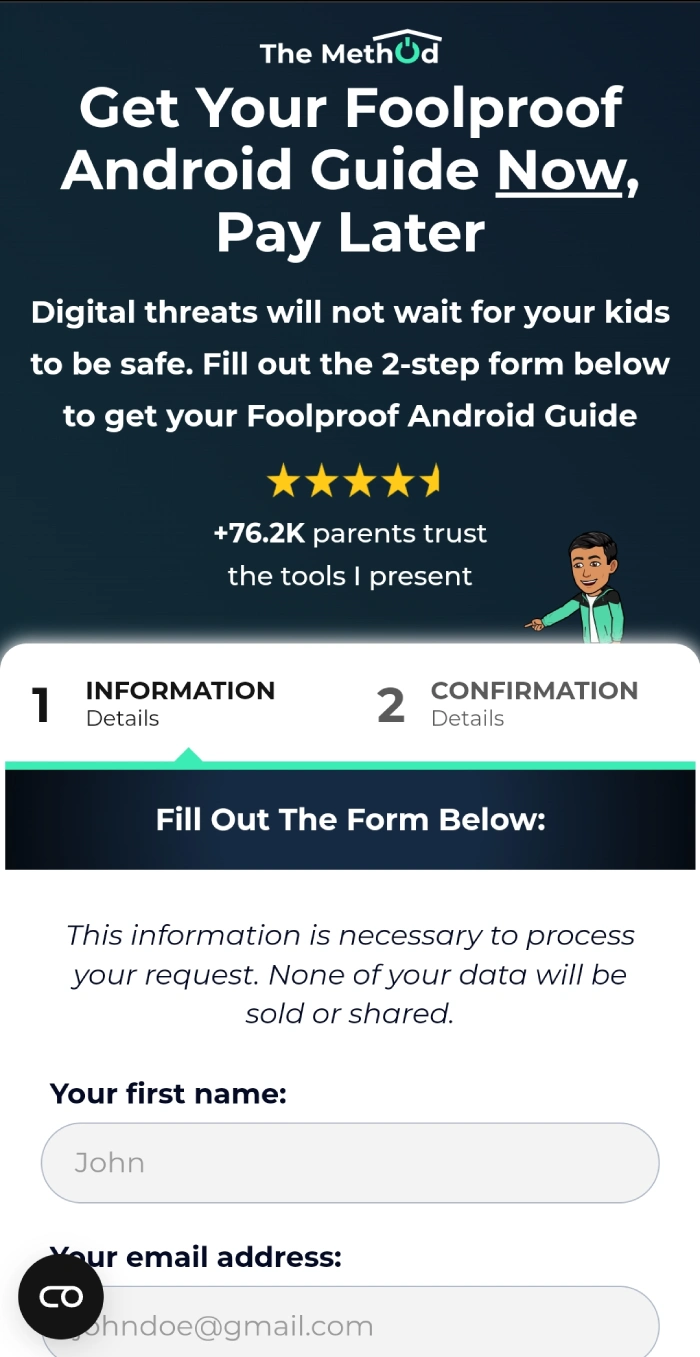
Once you're there, fill in your details, click on "next step," choose your payment method (credit card, Paypal, or Apple Pay), then click on "order."
That's it! You'll get access to your guide right away.
Click on the button below to order your Foolproof Android Guide and protect your kids like the tech-savviest parents:
This button will bring you to a secure order page
+76.2K parents trust the tools I present
FAQ

I'm Vic, 24, a geek concerned by the impact of screens on the youth (as every specialist, teacher, and psychologist witnessing the recent and drastic change in the youth's skills and cognitive abilities).
I can't change laws or make all parents aware of these issues, but I can help the ones who want to protect their kids properly.
As I helped my friends bypass their parental controls when I was a teenager, I know my way around parental controls. I know what works and what doesn't. Even more since I spent almost a year figuring out a foolproof parental control solution on Android. And I did it because today, I side with parents - with you - to contribute to the well-being of the next generation: your kids.
It makes me feel useful. It gives my life a purpose.
And I admire the parents who come here. They're responsible, loving, and caring, and even during the toughest times, they stand still and continue to provide the best environment possible for their kids. They want what's best for them and take the time to seek advice about it. You guys are amazing. And when I help you, it puts the biggest smile on my face. Thank you for being you.
No, it's a step-by-step process to set up foolproof parental controls on Android devices thanks to the Android parental controls that are embedded in your kids' devices (they are free).
Nevertheless, these controls are not perfect from the get-go. And it takes a lot of testing, tweaking, and expertise if you want to figure out by yourself how to make them foolproof. It took me months. To avoid you and other parents all this trouble, I made the Foolproof Android Guide. You'll find a simple process, with video tutorials for every click that'll transform your kid's devices into harmless toys with safeties that they can't bypass.
Click hereto order your Foolproof Android Guide.
No! The tools used in the guide to set up foolproof parental controls are all free.
You won't need to buy another app or pay a subscription.
So, on top of having foolproof parental controls, you'll save the hundreds of dollars that paid parental controls would have cost you over the years. How sweet is this?
Click hereto order your Foolproof Android Guide.
There's no limit - you can protect as many devices as you want! The price is the same even if you set up a thousand devices:
You can use it for your siblings' kids, your cousins' kids, your neighbors' kids'... I don't care. Actually, I'd be glad that you'd do so: I wish there would be more devices protected the right way!
Click here to order your Foolproof Android Guide.
Yes, if you have an iPhone, the Foolproof Android Guide will work as long as your kids have Android devices (Samsung, Lenovo, Motorola, etc.)
Click hereto order your Foolproof Android Guide.
NEW - I've included a fast-track version of the guide for techies!
What I've explained below is still valid though:
If you're tech-savvy, you may figure it out by yourself after some trials and errors.
Also, make sure to add Cleanbrowsing's DNS address to the private DNS settings of the devices to improve the content filter and to block websites and browsers that are advertised as "anonymous." And include apps with in-app browsers in the daily screen time limits because they can be used to circumvent it. There are a few other things to take care of, you'll probably be able to figure it out after a while if you're tech-savvy.
But if you are busy or aren't that tech-savvy, I'd recommend that you follow the guide just to be sure:
A few things to pay attention to aren't that obvious (some important settings in the Google account, a few apps and websites to block on Samsung, adding a private DNS, etc.)
And you wouldn't know if you got them right before it's too late (i.e. your kids seeing unspeakable things or just numbing their brains on social media late at night until you catch them in the action). The Foolproof Android Guide is the way not to take any risks and have to figure it all out by yourself. Plus, you get my help if you need it.
If you're still not sure that you need the guide, remember: you can buy it and see by yourself without risking anything because you have up to 3 months to ask for a refund.
Click hereto order your Foolproof Android Guide.
You can let your kids try to bypass your parental controls (you'd see on your phone if they'd succeeded in doing so).
Or, better and safer, you can do what your kids would do to try to bypass your parental controls:
After you set up your kids' devices with your Foolproof Android Guide, search on Google for tutorials. You'll find plenty of them. They're really easy to follow, even if you're bad with technology.
Try as many of these "hacking tutorials" as you want. None of them will work! And you don't even have to take my word for it:
Order your guide and see for yourself without risking anything: you have up to 3 months to test everything you want.
Click hereto order your Foolproof Android Guide.
The Foolproof Android Guide is for Android tablets and smartphones.
I will release a solution for computers at some point. As a customer, you will get a big discount on it.
Click hereto order your Foolproof Android Guide.
The Foolproof Android Guide is not a PDF. Right after you buy it, you'll have access to an online space with video tutorials showing you how to secure your kids' devices. I've recorded videos throughout the entire procedure, so you can follow what I do, click-by-click. It's that simple. And if you have any trouble with anything, I'll assist you.
Click here to order your Foolproof Android Guide.
Not that I'm aware of. And I tested A LOT of them, for months. Probably all of them, actually.
Some companies advertise their app as "not deletable." Not only is it seldom true (hello, recovery mode and factory reset), but you don't need to delete a parental controls app to bypass it. For instance, many of them don't protect in-app browsers. So they're basically useless.
This is also why "tamper-proof" apps (which tell you if your kids delete it) aren't worth it either; kids don't need to delete a parental control to bypass it. And there are plenty of ways to do so without alerting the parent app.
If you want to do your own research, be very careful. I fell into the trap a few times:
Some parents on Reddit or other forums vouch for apps that are not foolproof. Don't trust their opinion; they just don't know what they're talking about, or their kids didn't find the right tutorial yet.
There are also a few review websites and bloggers who promote apps for commissions and claim they're foolproof, but... they aren't.
And you may say that if I were doing that too, you wouldn't know. But unlike these guys, I offer a 3-month money-back guarantee. Because I know what I'm talking about.
Click here to order your Foolproof Android Guide.
You don't have to jailbreak your kids' devices.
And, yes, the process is totally reversible (it's also shown in the guide).
Click hereto order your Foolproof Android Guide.
Not with the embedded Android parental controls, which doesn't offer such a feature.
Most apps allowing you to watch your kids messages are very, very far from being foolproof.
That being said, if you really want to monitor your kid's messages, there's one "almost perfect" monitoring app. Your kids will not know that it is monitoring their messages (unless you tell them), so they won't try to circumvent it.
Note that, unlike the embedded Android parental controls, this app has a subscription. It's not included when buying the guide. Please understand that this monitoring app is a separate product. But you don't have to purchase it for your parental controls to be foolproof and to have all the features described on this page.
It's just that, if you're interested, you'll learn more about this message-monitoring app in your Foolproof Android Guide after setting up your parental controls.
Click here to order your Foolproof Android Guide.
I offer a 30-day free trial. The longest - by far - on the market. And, on top of that, I also offer a 3-month money back guarantee. Because I'm a hundred percent confident that you'll love the Foolproof Android Guideas many parents do.
And I know that even in 3 months, neither you nor your kids will find a single way to bypass the parental controls you set up.
(Actually, if they do, call the CIA, because your kids are Chinese hackers.)
Click here to order your Foolproof Android Guide.
I've recorded every click. If you know how to download an app, click on buttons, and type on a smartphone keyboard, you will not have any trouble. But let's say you do:
- First, you have my support if you need it. Tell me your issue, and I'll help you.
- Second, in the worst-case scenario (looking at a screen makes you nauseous), you can ask one of your relatives to do it for you or with you!
And if you have no one, I'm here.
Click here to order your Foolproof Android Guide.
Nope, because they won't be able to jailbreak their devices. By following the guide, you'll prevent the developer options from being enabled and used, making the devices impossible to jailbreak.
The same goes for other tricks:
Battery optimization, guest user, VPN/proxy, factory reset, airplane mode, in-app browsers, time change... I've tried every trick under the sun and their combinations, multiple times, in every way possible. Nothing works as long as you follow the instructions in your guide.
And if you don't believe it, try it for yourself! The 3-month money-back guarantee is here for you not to have to take any risk.
Click here to order your Foolproof Android Guide.
To contact me, send an email at contact@themethod.us or click here and fill out the form. I'll get back to you as soon as I can, usually in less than 24 hours. I look forward to chatting with you!
Better than paid parental controls, for a one-time payment of $47
Click on the button below to order your Foolproof Android Guide:
This button will bring you to a secure order page
+76.2K parents trust the tools I present
Here are your options:
You could scour the net in search of another truly foolproof parental controls solution on Android (good luck; I didn't find one in months of research and testing)...
Or...
You could forget about parental controls and battle every day with your kids regarding screen time, constantly check apps installed on their devices, and know they'd stumble upon inappropriate content sooner or later...
Or...
You could try to set up the embedded Android parental controls by yourself - figure out the right settings and details that make it un-bypassable.
But even if you're a techie, there are several things to test and figure out. Nevertheless, if you're willing to put in a lot of time and efforts, you may not need my guidance.
Another of your options is to search for some YouTube tutorials.
But you'll be left wondering which tutorial gets it right. Maybe there are some that do, but I didn't find them. And although some claim to show how to make the embedded Android parental controls impossible to remove, it doesn't make them unbypassable.
In short, YouTube won't help you make the embedded Android parental controls foolproof. Actually, nothing on the internet will.
Otherwise, I wouldn't have bothered to make a guide!
Last option, you get your Foolproof Android Guide to set everything up without hassle, and with 100% certainty that it's foolproof.
Plus, you get my personal guidance in case you need it. And the updates. And the guarantee.
This way, you protect your kids like the tech-savviest parents without needing to be a techie, you don't spend a lot of time doing so, and you move on with the other important things you have to take care of.
...Without worrying about what your kids may see or do online...
...Without having to negotiate or fight when it's time to eat, do homework, or do chores... Or just enjoy the world around them.
You'll have done everything you could to protect them in a world that has yet to provide such protection against Big Tech.
To get your guide, it's simple:
Click on the pink button below. You'll be taken to this order page:
Once you're there, fill in your details, click "next step," choose your payment option (credit card, Paypal, or Apple Pay), then click on "order."
That's it! You'll get access to the Foolproof Android Guide right away.
And remember, there's a 30-day free trial + a 3-month money-back guarantee.
Click on the button below to order your Foolproof Android Guide and protect your kids like the tech-savviest parents:
This button will bring you to a secure order page
+76.2K parents trust the tools I present
Working with caring, tech-responsible parents fills me with joy. Thank you for doing the right thing!

Copyright 2023 © Vivien Willard VW NWEI Unlimited Creative Sector - 5 Av. du Général de Gaulle, 94160 Saint-Mandé, France. All Bitmoji Avatars are owned by Snap Group Limited.